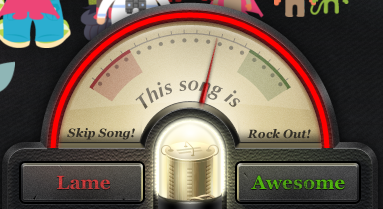
Izzmo's Turntable.fm Auto Awesomer
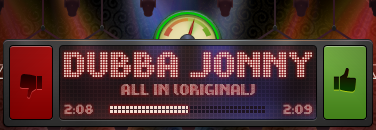
This script allows you to enjoy turntable.fm music without getting paranoid about voting for every song, which you should be doing! Instead, forget the hassle and turn this on to have the songs you listen to get voted awesome automatically!
If you do not like a song, simply go back to the turntable.fm room tab and click lame, and the counter will not resume until the next song!
Features
- Automatically votes awesome for every song you listen to in your turntable.fm room.
- Allows for song laming. If you don't like a song, this script isn't like others. It will see that you lame'd a song and wait till the next song to start awesomering again.
- Never go AFK! This script will keep you active in the room; so if you are working while DJ'ing, you can be sure you will never get booted for being AFK.
- No more idle boot! If you have ever sat in a room too long (usually around 2-3 hours) without voting, you will get booted back to the lobby for being AFK. No more! This script resets your idle timer.
Get Yours Today!
Izzmo's AutoAwesome (Drag this link to your bookmarks bar).
Test Version
Izzmo's AutoAwesome (Test Version) (Drag this link to your bookmarks bar).
Changelog
- February 17th, 2012:
- Extended the time to check for interface changes (when changing rooms) so the AA interface comes back up.
- February 13th, 2012:
- Added in some extra validation to make sure the awesome arc was not going passed 180 degrees.
- February 12th, 2012:
- Room Switching is now supported. If you move to another room on turntable, the AutoAwesome will stay intact!
- If you are DJ'ing and currently playing a song, the AA will no longer try to awesome that song.
- February 11th, 2012:
- Fixed bug where AutoAwesome would not start. Please email me or chat with me if this is still happening to you!
- Added a awesome arc. This is much like a counter, but graphical instead of raw numbers. When it reaches the other side of the vote meter, it awesomes the song.
- Added visual feedback. If you awesome the song before the countdown is up, it will stop and turn green; or if you lame it at any point, it will stop the countdown and the arc will turn bright red.
- January 23rd, 2012:
- Added support for laming a song and canceling the auto awesome for the song. (Support for this was taken out of the beta build but re-added shortly after release).
- Awesome once per song. Now the AutoAwesome only awesomes the song once per song instead of multiple times with the countdown method.
- No more countdown! The simplified interface will hopefully answer some peoples questions the first time they operate the AutoAwesome and wonder what the countdown is.
- Added support so if you click your bookmark multiple times, only the first time will start the bookmark. This prevents you from getting weird countdowns and causing multiple awesomes for each song.
- January 10th, 2012:
- Fixed a problem with the AFK timer not working.
- December 13th, 2011:
- Updated some core functions so they do not rely on timers anymore, but more of Turntable's default functionality.
- December 6th, 2011:
- Movable! You can now move the button wherever you would like on the screen. Note: In Firefox, it is a little buggy. To move it, you must select the part of the circle that is not a link (hand cursor) or else when you stop moving it, it will close it.
- The timer button (green circle) now shows in top left corner.
- Bug Fix: Some users were experiencing a "callback reference" error.
- December 5th, 2011:
- Better lame support. When you lame a song with the AA script running, it will not suspend the timer and resume upon the next song so a song you lame stays lamed.
Not Working?
Try the steps below to add it to your bookmarks bar in Chrome or Firefox.
- Right-click on the bookmarks bar and select "Add Page" in Chrome or "New Bookmark" in Firefox.
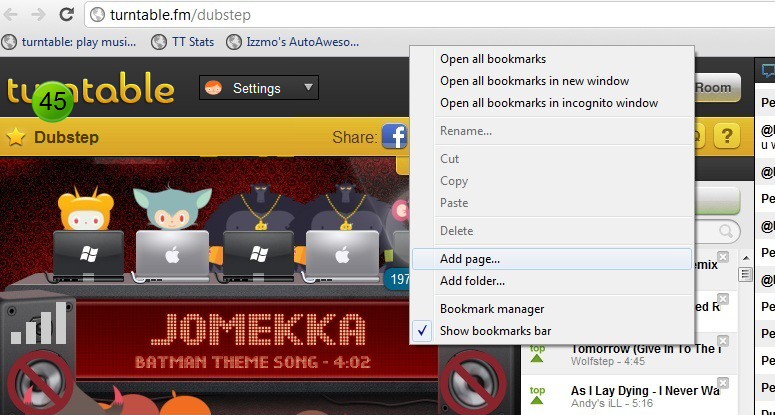
Name the bookmark whatever you would like (Ex.: "AutoAwesome"), and then in the URL field add this:
javascript:(function(){$('body').append('<script src=\'http://pinnacleofdestruction.net/tt/autott_voteonly.js\'></script>');})();
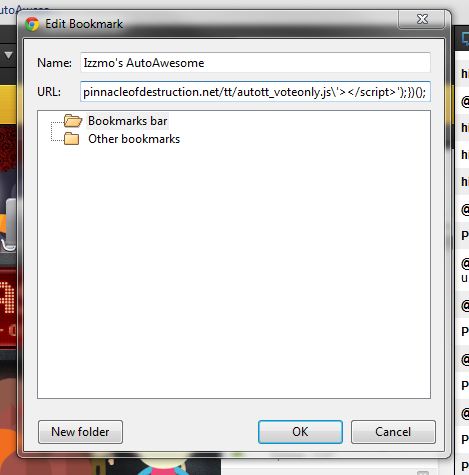
Save the new Bookmark. To activate the script, the turntable room tab must be the current tab. Once viewing the turntable room tab, click on the bookmark you just created and the following box should appear.